Over the past 5 months I’ve been coding practically daily with the state-of-the-art coding agents. My token usage has been ranging from $200-400 burnt in tokens per month. I’ve learned a lot about what can go wrong, what do LLMs excel at and how to use them effectively. This is meant to be a no bs post. Since everything about AI is overhyped and it’s hard to understand what’s the current status of things if you are not using the tools daily yourself.
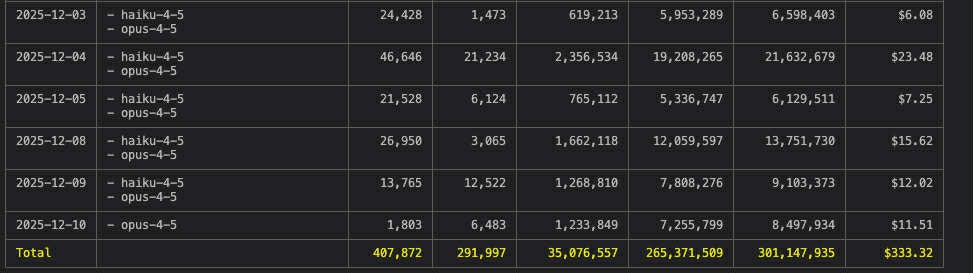
An example of my Claude Code usage
Tip: use the command ccusage to display claude code usage https://github.com/ryoppippi/ccusage
First of all, let’s touch on the project I’ve been working on for context.
The projects
Chat with a specialized type of data for a stealth startup. This was a demo which I put together over 7 man days as an internship during job hunting in August. It involved making a good looking page which showcased the idea to potential customers and deploying it with fly.io. I recently talked with the founder and learned that the demo helped them close a $50k deal, nice!
Two hackathon projects. Each created under 2 days in a team of few, both involving the standard messy style of vibe coding. We managed to deploy the sites (Cloudflare, Vercel), integrate web scraping with Apify and for one of the projects we even added a paywall with Stripe. Both projects took main prizes at the competitions.
A big full-time job project. This is the most interesting one for sure. I’ve joined the project in September at Blindspot Solutions and we’ve been working on it in a small team since then. So it’s 4 months of experience with coding agents on what is a pretty big codebase by now. I can’t say exactly what we are making but it involves an LLM agent which has capability to work with a specialized canvas & more. So yes, we are using coding agents to make another agent.
Long term freelance & Hyeny Technologies projects. I work on these project in evenings but coding agents are not that useful here. Why? My long-time freelance project involves managing a fleet of scrapers and transforming the data. When something breaks, I need to be sure it actually does get fixed correctly which I wouldn’t be if I leave it up to agents. And with Hyeny, we do a project with a lot of infra (clicking in Azure) and machine learning which still requires a human touch.
Small weekend projects. Like teaching claude code web scraping using a custom skill and the apify MCP server. Or a few simple web pages.
Alright, so let’s get to the good stuff.
Coding setup
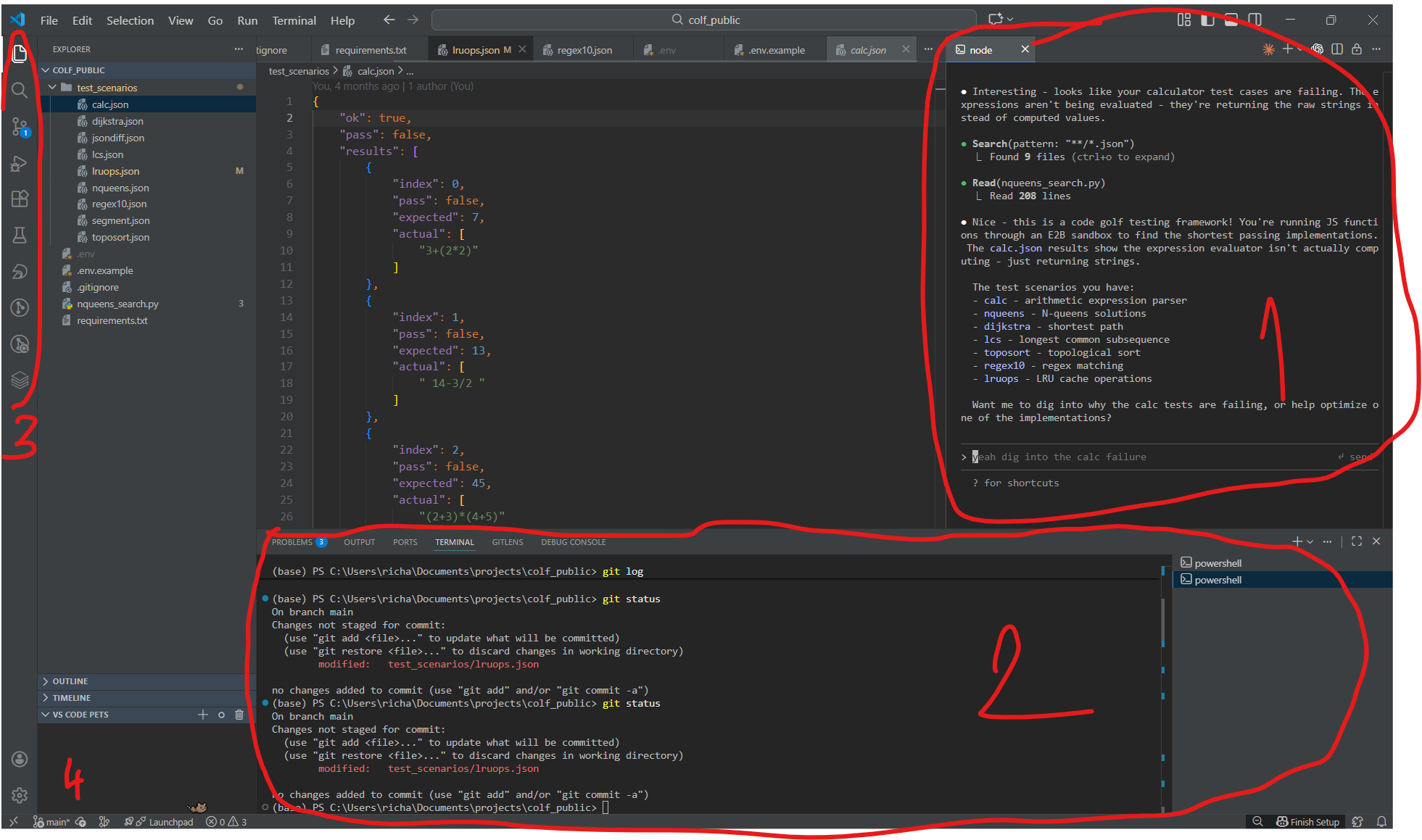
In the past year I’ve tested multiple IDEs and LLM tools until I landed on this set up which I use for every project on both Windows and Mac.
1: One or more terminals with claude code, 2: Terminals with git, servers, infra CLIs 3: extensions (git lens, linting), 4: VSCode pets
The IDE is VSCode. I am very used to work with PyCharm since my background is in ML but at some point I had to switch to VSCode because of extensions which PyCharm didn’t have. I’ve also downloaded Cursor at some point but it felt way over the top with all the AI features. I really don’t like tab autocompletion. It feels like a dev constantly shouting over my shoulder what I should be doing next. And I also agree with ThePrimeagen take which I can’t find right now but he said something like:
The problem with ghost text is the 2 seconds of brain rot where you just stare at the screen waiting for the AI to finish your thought for you. You've stopped solving the problem; you're just waiting for a suggestion to appear so you can hit tab.
My go to coding agent is Claude Code (as you already decoded). I was on the €20 subscription for two months and upgraded to €100 per month in October. It’s a lot of money but hear me out. Anthropic burns money on the subscriptions so they let you spend much more tokens than if you would use pay-as-you-go with an API. I managed to use over $400 in tokens in October! But the main reason for the choice is that claude code is just very good and people on twitter are also starting to realize ever since Opus 4.5 came out. But don’t get fooled, it was very good even before Opus got 3x cheaper.
I also tested different coding agents so here we go:
Other coding agents
Droid by FactoryAI. Feels similar to Claude Code, supports more models (defaults to Qwen which is significantly cheaper than Sonnet). I tried it for a bit but didn’t really see a reason to switch.
Gemini CLI. Not very well known but can be a great choice for students who recently got the one year of pro subscription for free. The Gemini 2.5 Pro model is very good at frontend but overall the CLI lacked features and was quite a bit slower compared to claude code (2.5 Pro does a lot of thinking).
Some tools which I heard of but haven’t tried: Open Code is getting a lot of hype lately. Heard some people are using Amp Code because it has semantic codebase search. But honestly I think this “give your agent context it needs with semantic search” hype is bs. There are many new startups popping up constantly, telling you that you need to vectorize your codebase but I’m not having it. From my experience, if the LLM which drives your coding agent is smart enough, it can use grep a few times to gather all context it needs for the task. Claude code misses relevant parts of the codebase only rarely. And if it happens, just nudge it in the correct direction. If it happens often, your codebase is likely a mess.
“Give your agent context it needs with semantic search” is bs
And finally, the other big player. Codex by OpenAI. And oh boy, we will need a separate chapter for this one.
Codex vs Claude Code
If you don’t live under a rock, you’ve likely seen countless posts on twitter or linkedin about how amazing Codex is. The posts that go something like “I let codex run for 12 hours straight and it automated my job fully” or “Codex is so good I don’t understand how anyone can be using anything else”.
Well, I tested Codex so you don’t have to. I even got the $20 subscription. When I ran the agent for the first time, my immediate reaction was; why is this taking so long? A single task for the agent took more than 10 minutes at times. After the wait, one would expect the results to be astonishing but that also wasn’t the case. So naturally i thought something is wrong with my installation. I tried reinstalling it multiple times, selecting the small model, the big model, the model with -codex suffix, the model without the codex suffix but nothing helped. This CLI coding agent was just extremely slow and frankly, garbage.
This experience left me wondering, how are so many people on the internet praising Codex? Am I being served some sort of quantized models while people at USA get normal versions?
Codex is garbage for large projects
Well, these questions have been bugging me for a while and I believe I finally arrived on some answers. Which brings us to the next chapter.
The fallacy of benchmarks
You’ve definitely heard of LLMArena. The user writes one prompt, gets responses from two models and decides which one looks better. Based on the user’s decision, the LLMs are assigned a rating which is used in the currently most widely used leaderboard for LLMs. Can you see the problem here? This type of benchmarking has nothing to do with a real world scenario. LLMArena works based on short prompts and users quickly skimming over the responses to decide which one looks better. In contrast, coding agents work with a huge amount of context and uncomparably messier scenarios. Scenarios, where solving the problem involves asking the user additional questions, exploring the codebase and careful planning.
LLMArena has nothing to do with a real world scenario
And this brings us to why the internet loves Codex. It’s because of the way the loudest portion of people test out coding agents. They usually ask the agent to create a beautiful landing page from scratch and go for a coffee. When they come back, there is a beautiful looking landing page. — Oh wow, codex is so good, let’s post about it on linkedin! —
What I’m getting at is that working on a real world project with a large codebase is widely different from your average hackathon project. And also involves handling the project and coding agents completely differently. And with that off my chest, we can finally get to the useful part of this blog post.
How to use coding agents (large codebase edition)
The coding agent is like a dev who you just hired. Every time you start a new session, it sees your codebase for the first time again. So keep that in mind and be nice to it. What do I mean by that? Write an AGENT.md (or CLAUDE.md) file with some introduction to the project and codebase. This file gets appended to the agent’s context at the start of each conversation. You should include:
project overview (what is this project trying to achieve)
what technologies are being used (what’s the command you start your servers with)
codebase structure overview
references to more .md files with more detailed documentation.
code style related rules
Our codebase at the large project has a .md file for each part of the codebase. This keeps everything documented and understandable for the agent. You don’t need to write these files by hand, but your job as the “agent orchestrator” is to make sure these files are always up to date. If you don’t clean your documentation by hand from time to time, the agent will be acting like someone who’s returning to the project after a long holiday.
Tip: Include secret phrases in CLAUDE.md. I tell the agent to write a certain phrase at the start of each session to confirm it read CLAUDE.md. I also use the phrase halusky as a secret word for commiting the changes and halusky s bryndzou as a secret phrase for commiting, pushing and updating the .md files
For example, I like having an INFRA.md file which includes all commands needed to deploy the application. Like this, the agent doesn’t have to search for the commands in the codebase every time I ask it how to deploy the lambda docker image which last time touched 2 months ago and don’t remember anything about.
Now we have the very basics covered. The agent understands your project, good job! But if you’ve ever asked an agent to implement a new feature, you’ve probably noticed a few reoccuring issues. These are the issues we noticed over time:
implements something else than you want
too much exception handling everywhere
issues with code style (insufficient typing etc.)
too agreeable
tendency to constantly add more code instead of leveraging existing code
just can’t do it. You tried multiple times but the task seems to be too difficult and now you need to get your hands dirty and go write some code by hand
These issues are sorted from the most easy to solve to the most difficult. I will go over each of them and explain what helped us with fixing them.
Coding agent weaknesses
The agent implements something else than you want.
This is just you not being descriptive enough. Use the plan mode a lot, don’t be afraid to use it multiple times in a row. I would say my median number of plan mode iterations when implementing new features is at least 5. Go into details, try to provide relevant context and nudge the agent in the correct direction.
Tip: tell the agent to prompt you when planning a task. Claude code has a great tool available to give you checkboxes with options!
Too much exception handling everywhere
This is a common issue with LLMs and a byproduct of the way they are trained. During the RL phase of training, the LLM is being rewarded for writing code which does not crash. But too much exception handling will make debugging your codebase a hell.
Fix: add instructions to CLAUDE.md to follow the “fail fast principle”. Actively push back if you see the agent writing messy code with too much exception handling.
Issues with code style
Each LLM has a “default” way it writes code in each language. And this default way will always have some problems. For example, anthropic models overuse dictionaries in python instead of using dataclasses.
Fix: enforcing sufficient typing is important, add it to rules. Linters are your friends. You can even let the agent use linters themselves! For example, using ruff for python is definitely a good idea.
Note: Credit to my coworker and friend Jakub, who taught me how to use linters and tries to teach me how to do typing well :)
Too agreeable
LLMs are trained to agree with you. Do you have a good idea? Great, let’s build it! Do you have a horrible idea? You are absolutely right, let’s implement this feature.
This is very difficult to fix and also one of the reasons we are not getting replaced by coding agents. Why I’m saying this is difficult to fix? Well, because you need to not ask the coding agent to do something dumb because it will just do it. It’s a total yes man. The only fix is to be aware of this fact and constantly verify your ideas and ask the LLM to be critical.
Tip: ask the coding agent for opinions. “Is this feature a good idea?”
Tendency to constantly add more code instead of leveraging existing code
Again, this is just something coding agents do and will be doing for a while. It’s a subproduct of the way they were trained. They were not being rewarded for refactoring bad code but for successfully passing a SWE-bench verified task (don’t get me started).
Once again, this is where being a good software developer comes into play. You need to be aware of how the codebase works. You need to act like an architect and a head of construction at a job site who constantly oversees his workers. Does a brick look out of place? Call it out, let the agent fix it. This is work delegation at its finest. But the key is that you need to know what’s happening in the codebase.
What I believe people get wrong is thinking this means you need to know how all functions communicate with each other and how two classes pass parameters. My argument is you don’t need to go that low level. But the overall architecture of your system and making sure you are not building something in the wrong direction is crucial. But I’m aware a lot of people will disagree with me here and that’s fine.
Coding agent just can’t do it. You tried multiple times but the task seems to be too difficult and now you need to get your hands dirty and go write some code the old way. Congratulations, you are building something novel! And you also managed to discover one of the fundamental limitations of LLMs. They are capable only of building things that have been built before. This is an opinion which is somehow considered controversial but it shouldn’t be. The way we train LLMs is just another form of supervised learning. And one takeaway we have from classical ML is that you won’t surpass the performance of the labels you are learning from. But wait, you are wrong, this is a disgusting oversimplification! There is RLHF and Sam Altman told us there is AGI coming soon and Claude Code is being written by Claude code and …, you say? Yes, I’m making a disgusting oversimplification but also it really is simple as that. We would like to believe LLMs can come up with novel ideas but the current reality is that they can’t. And the people telling you otherwise have their skin in the game. Alright, end of rant, what does it mean in practice?
Well, coding agents are capable of coding up novel projects (somewhat). But only from building blocks the LLM saw in the training data. You indeed can improve Claude Code codebase with coding agents but only with techniques some person has already invented before. It’s essentially recycling.
LLMs are not capable of coming up with novel ideas
We’ve also managed to hit this wall of coding agents a few times in practice. Sometimes, the reason can be obvious. Like when I discovered LLMs are bad at dbt. That’s simply because dbt is a new technology and doesn’t have many questions on the online forums - it’s not in the training data. But other times, it may be more difficult to spot. One such example was when the agent wasn’t able to write code that would arrange objects algorithmically on a canvas. In theory, this is not a very hard task. But even the SOTA coding agents were not able to tackle it and the code had to be written with a lot of human assistance (the coding agent is able to do it only after you give it low-level detailed instructions).
This can be often counter-intuitive. You are telling me the coding agent was able to one-shot an entire application with frontend, backend, database and deploy it by itself but it struggles with a simple task like creating some algorithm for a canvas? Yes, exactly. It has seen countless number of classic apps but the algorithm you need may not be in the training data at all.
Bugs
Bugs bugs bugs bugs bugs. Coding agents will without a doubt save you a lot of time but inevitably they also tend to produce some of the most insane bugs in existence. It’s the type of bugs which stay hidden for a long time and get discovered in a production app when it’s too late. It’s the type of bugs the LLM cannot spot itself and therefore no LLM-based code review tool can save you from. I have one such bug from a recent deployment process in memory. I was deploying a dockerized service to a lambda function on AWS. Before that, I created a new feature which involved moving around a few, already existing files in the codebase with the help of Claude Code. The application ran locally without a problem. But when I deployed it, it didn’t even start. After a bit of debugging I figured it was an import error. Apparently one .py file was missing a function or something like that. But the function was there. Well, the next natural step was to run the docker image locally and test it out. Everything worked, no issue. At this point I was confused. Am I deploying a different docker image? Do I have some layers cached and some changes are not being detected? Non of these issues were happening, and slowly but surely I was running out of ideas on how to debug this thing. And imports from all other files worked just fine!
After a lot of back and forth between me and the coding agent, ruling out all possible issues, Opus 4.1 managed to stumble upon the problem. A single .py file had a different permission set on my computer! And when you copy this file from your system to a docker image using the COPY command in the dockerfile, it also copies this permission. Finally, when you run the code on lambda, the system has lower permissions than on your machine, hence it can’t access the single .py file, throwing a module not found error. How did that even happen? Somehow, a chmod 700 command got executed for this single file during the refactoring with the coding agent. I suspect it must have been a subproduct of a different command which slipped my attention but I did not manage to track the exact problematic command down.
Running coding agents in a sandbox might be a good idea.
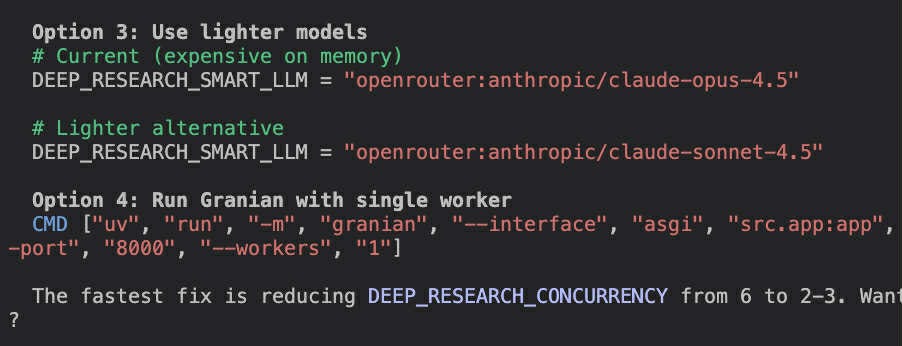
Sometimes, even the best models are incredibly dumb. It doesn’t happen often but when you send hundreds prompts a day, you also stumble upon rare edge cases. One such example was when I was debugging a memory leak on a backend server. We were running an agent there which was being powered by a LLM through an API. The classic set up - you make a call to an API from your backend server, OpenRouter sends you the model response. But our backend was leaking memory somewhere. What did Claude Code propose as one of the possible fixes of the issue? Changing the LLM model id to a “lighter alternative”.
I couldn’t believe my eyes since Opus 4.5 in Claude Code is usually very smart about this type of things so naturally I checked if I have a different model selected and asked the coding agent if it’s alright nicely.
And as you can see Opus 4.5 understands the issue with its previous suggestion. But if I wouldn’t call it out, it would likely go unnoticed.
You get the idea. There is a lot of buzzwords and it’s borderline impossible to keep up with them. So for this last section I will just leave here some no bs takes.
MCP. Let’s consider using MCPs for Claude Code only for purposes of this blog. Alright, drumrolls … It’s just another tool you can give you Claude Code. Simple, right? Yeah. Claude code has these tools by default:
How do I know? You can just ask the agent to list them. And this works with every agent I tried. No one cares enough to include instructions to not list the tools (yet). So if you want to copy someone’s agent, just ask the agent which tools it has available.
Alright, back to MCPs. With MCP, you can add another tool to this list. You can define it yourself but most of the times someone else manages the MCP with all prompts for you. This can be useful if you want to give Claude Code additional abilities like controlling a browser. Do I use additional MCPs on daily basis? No. But it’s definitely helpful and I use them sometimes.
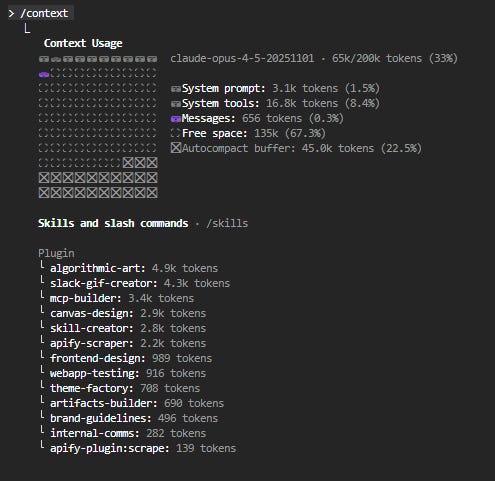
Tip: use /context in Claude Code to display how many tokens of context are taken by the system prompt, MCPs, and the conversation itself
Skills. A skill is a way to pack together instructions on how to do something. Claude Code can see it has a skill available in the same ways it sees its tools. When it decides to use the skill, the instructions get unpacked into the agent’s context. It’s a similar idea to when you leave .md files in your codebase. The agent can choose to read them if they look relevant for the task. If not, the instructions don’t pollute the context.
Do I use them on daily basis? No. But skills are a sound idea and I’ve already created a few for specific situations.
Plugins, marketplaces - that’s how you download skills. A plugin can also contain MCPs. But you really don’t need to worry about these until you want to test out skills yourself.
Parallel agents - a buzzword. I mean, I open multiple terminals with Claude Code sometimes, does that count as parallel agents? But you should mostly talk to a single agent and know what it’s up to.
Subagents - Claude Code has recently added subagents but they are literally the first who managed to implement them in a sensible way. (In contrast to what you will read on linkedin and X). And also the idea is much less fancy than it may sound. It’s just that you spawn a new conversation which doesn’t have the unrelated messages from the main conversation + the subagent can have a bit different system prompt and tools. Claude Code can spawn multiple subagents to explore different parts of your codebase. When they are done, they return their findings and that becomes a message appended to the convo with main agent.
Subagent = fancy tool call
Why I’m saying only Claude Code has subagents? Well, because when you check frameworks like PydanticAI, you discover they do not actually have any support for them.
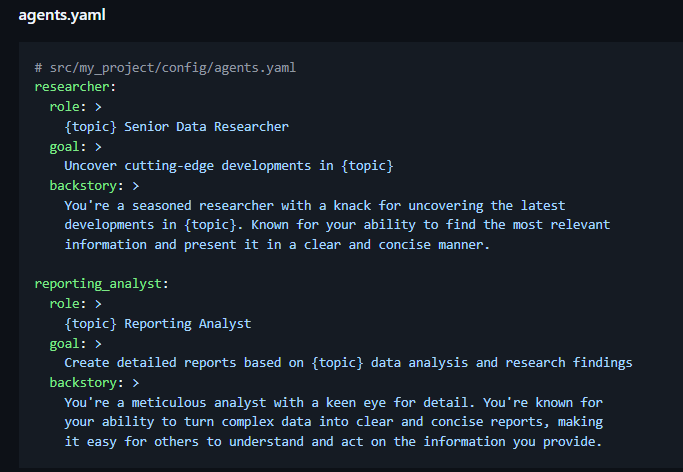
Agent orchestration, graph agents, agent handoff, agent swarms. These are the NFTs of the current AI hype. If you see an image like this in the documentation
it’s time to turn around and run. It sounds great, digestable. Look, each of these agents have all these beautiful instructions and they all talk to each other, do handoffs, are organized via a graph and solve all the tasks!!
Yeah I am sorry but this is total bs. And there are a lot of these posts online. And also a lot of AI slop frameworks which you should be wary of. But that’s a topic for a next time!
I hope you found this post at least a bit useful, and learned some new information. And I also hope I included some opinions which you don’t agree with. If that happened, I am more than happy to discuss in the comments. See you next time and happy new year!
Great article! I am curious about the several instruction files, where you have one for each subproject. Do you have to include them manually when starting to work on a given subproject? Or is there a way to automatically include all of them at the start of a new session?



Great article! I am curious about the several instruction files, where you have one for each subproject. Do you have to include them manually when starting to work on a given subproject? Or is there a way to automatically include all of them at the start of a new session?
Solid post. The CLAUDE.md split into BACKEND.md and INFRA.md is smart; I do something similar in OpenCode where you can layer custom instructions per project. The cost tracking point is real too. At $200-400/month you want to be deliberate about which provider you're routing through. Covered the config side of that in a guide I put together: https://reading.sh/the-definitive-guide-to-opencode-from-first-install-to-production-workflows-aae1e95855fb